


Foreca Weather & Radar
4.61.10K Reviews
App Specs
- Version
- 4.80.4
- Updated On
- License
- Free
- Downloads
- 1,000,000+
- Developer
- Foreca
- Categories
- Weather
- Platform
- Android, iOS
Screenshots
 Analysis by AppCompare
I judge a weather app less by how much information it can display than by whether it helps me make a better decision before I leave home. Foreca Weather & Radar aims to do both: give a quick read on conditions and offer enough detail to look ahead. In my experience, its best quality is the balance between a readable daily forecast and tools for checking what may be approaching. It is not the quietest or simplest option, but it can be a useful companion when weather affects your plans.
Who will get the most from it
I can see this working especially well for people whose routines involve several places or a lot of time outdoors. A commuter might check the hourly outlook before choosing a route or deciding whether to carry a raincoat; someone with family in another city can keep that location alongside home. Saving places makes those checks quicker than repeatedly searching, and it turns the app into a small planning dashboard rather than a one-location glance.
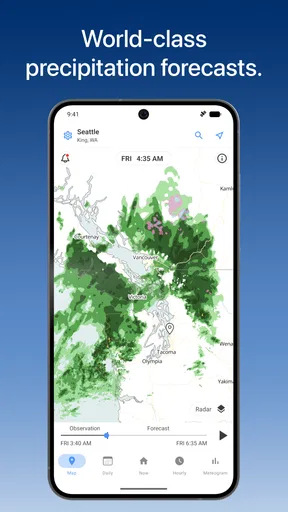
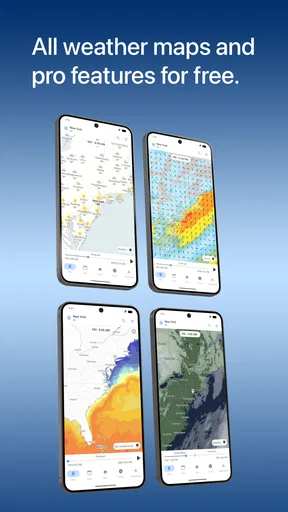
There is a useful distinction between checking a forecast and checking the sky right now. A daily summary may tell me whether the day looks broadly wet or dry, but it cannot answer every practical question about timing. That is where the hourly view and map complement each other: I can use the forecast to plan around the day, then inspect the radar when a shower might affect a walk, errand or drive. I would treat that combination as decision support, not a guarantee that local conditions will unfold exactly as shown.
A forecast is most useful when tied to a decision
For example, imagine I have errands in the afternoon and a short walk planned afterward. I would check the hourly forecast early, then revisit the radar shortly before leaving if rain looks possible. If the map suggests a band of weather nearby, I can shift the walk or take suitable clothing; if it does not, I can avoid packing for every possibility. The value is not simply seeing more weather data. It is being able to make a modest adjustment at the right time.
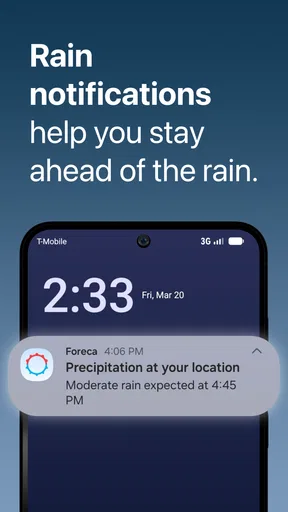
That workflow also helps keep notifications in perspective. I would choose alerts for conditions that could genuinely change my plans, rather than turning on every possible prompt. Too many notifications can make a weather app easier to ignore, especially when most days do not require action. Keeping the alert setup focused makes an important warning more noticeable and leaves routine forecast checks under my control.
How it fits beside other weather apps
Compared with a basic phone weather screen, Foreca gives me a more hands-on way to inspect conditions: I can move from a quick snapshot to hourly detail and then to a map. That extra context is useful when timing matters. On the other hand, if all I need is the temperature before stepping outside, a built-in weather app may be faster and less visually busy. I would not install this expecting every glance to be simpler than the default option.
It also occupies a middle ground between minimalist forecast tools and apps that make maps the main event. The radar is a meaningful part of the experience, but the app remains useful for everyday forecast checks too. People who enjoy inspecting weather systems will likely appreciate that balance. Someone who wants a nearly empty screen, or who prefers to make every decision from a single short summary, may find the amount of information more than they need.
Worth Reading Before You Choose

EA SPORTS FC Mobile 26 Is a Bigger Football Game, but It Takes Time

Flipboard Shows What News Apps Must Do Beyond the Feed

Switching to Android Auto Means Rethinking Your Driving Routine

Google Calendar Makes a Crowded Week Easier to Manage

Ludo King Makes the Most of the Minutes Between Plans

Baby Panda World Brings Quick Play to Modern Phones, but Its Game Library Feels Busy
In the weather category, no interface can remove the uncertainty of forecasting. Conditions can change locally, and a map is a representation to interpret, not a promise about the exact weather at a particular doorway. I would check again before a weather-sensitive outing, especially if plans depend on a narrow window. For a major trip or an activity where conditions have serious consequences, I would use more than one dependable source rather than treating any one app as the final authority.
Small habits that make it easier to use
One practical tip is to keep saved locations limited to places I actually check. A short list of home, work and a regular destination is easier to scan than a collection of cities I rarely visit. For travel, I would add the destination when planning and remove it when it stops being relevant. This keeps the location feature useful instead of turning it into another screen full of choices.
I would also use the map to answer a specific question rather than repeatedly zooming around without a plan. “Is weather moving toward my area?” is more actionable than staring at a radar image and trying to infer the whole day from it. Pairing that check with the hourly forecast helps separate immediate changes from the broader outlook. It is a small workflow, but it makes the app’s extra detail feel purposeful rather than overwhelming.
If a forecast seems surprising, I would compare its timing with what I see outside and check again later instead of assuming either the app or my first impression must be right. Weather changes, and forecasts are estimates. That cautious approach is particularly helpful for outdoor plans: use the app to prepare, then stay flexible when the sky gives you new information.
For anyone deciding whether to try it, the basic proposition is straightforward: this is a free weather app from Foreca, with a 4.6 average from around 187,000 ratings and over a million installs. It is rated for Everyone, and the current version is 4.77.1. The app has been available since October 11, 2011, so it is an established option rather than a new arrival. Those details do not tell me whether its layout will suit every person, but they do make it a familiar choice to consider.
The app’s optional in-app purchases range from $1.49 to $4.99 per item. I would start with the free experience and decide whether any paid option solves a real annoyance for me, rather than paying simply because a premium tier exists. The free version gives a practical starting point; users who strongly dislike advertising or want whatever extras are offered may weigh the upgrade differently. If keeping costs at zero is essential, I would check the current purchase details in the app before making a decision.
Compatibility is another simple check before installing: it requires Android 7.0 or later. That makes the operating-system requirement worth confirming on an older device, particularly if the app is intended for travel or a family member’s phone. The interface and features can also change with updates, so I would judge the version currently available on my device rather than expect every screen to match someone else’s experience exactly.
The central trade-off is clear to me: Foreca is more useful when I want context, but that context takes a little attention. If I only want a quick temperature, it may feel like more app than necessary. If I regularly compare locations, plan outdoor time or want to inspect radar before changing plans, that added depth is easier to justify. I would recommend it most to curious, practical users who prefer to check a forecast rather than just glance at one.
Ever find yourself caught in the rain without an umbrella, or planning a weekend hike only to discover the weather's taken a turn for the worse? Enter Foreca Weather & Radar, a handy little app that promises to keep you in the loop with all things meteorological. Not only does it give you real-time weather updates, but it also packs in a bunch of cool features to make sure you're never caught off guard by Mother Nature again. Let’s dive in and see what this app has to offer.
Features that Shine
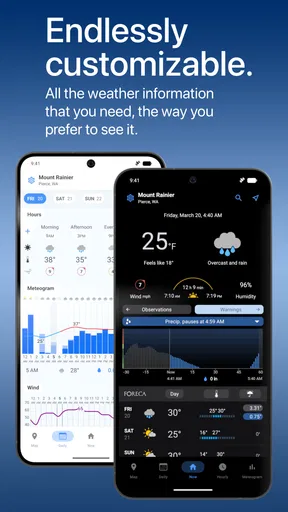
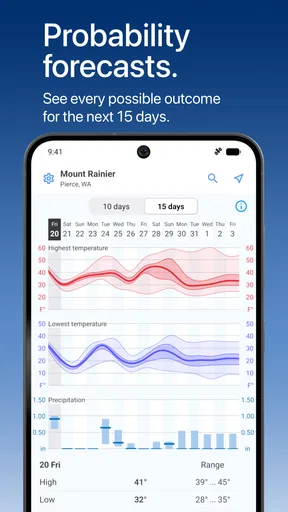
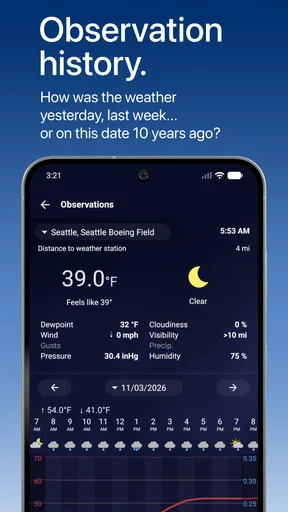
When I first opened Foreca Weather & Radar, I was greeted by a clean and intuitive interface. The app is designed to be user-friendly, which is always a plus. The home screen gives you a quick snapshot of the current weather, including temperature, wind speed, and humidity. But it doesn’t stop there. You’ve also got a detailed hourly forecast that’s super helpful for planning your day.
One of the standout features for me was the interactive radar map. It’s super detailed and lets you see real-time weather patterns. You can zoom in and out, which is perfect for checking out what's happening locally or seeing broader weather systems. This is great for travel planning or just satisfying your inner weather nerd.
Weather Alerts and Notifications
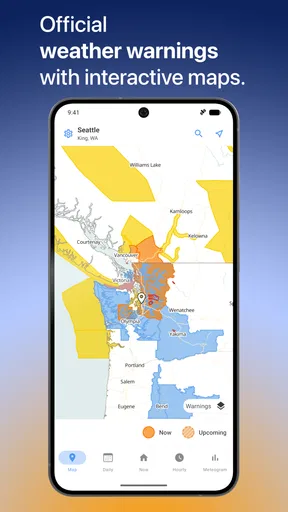
You’ll also appreciate the alert system. You can set up notifications for severe weather conditions, which is a lifesaver if you’re in an area prone to sudden changes. The alerts are customizable, so you can tweak them based on your preferences. No more surprises when a thunderstorm rolls in!
Customizable and Personal
Another feature that I found really useful is the ability to personalize your weather feed. You can save multiple locations, which is perfect if you want to keep tabs on the weather in different cities. Whether you’re a frequent traveler or just want to know what’s happening at grandma’s house across the country, you’ve got all the info you need at your fingertips.
Data Accuracy and Reliability
Now, let’s talk about the most important aspect of any weather app—accuracy. Foreca sources its data from reliable meteorological services, which means you’re getting precise forecasts. I found the predictions to be spot-on most of the time, which is crucial when you’re planning outdoor activities.
Room for Improvement?
No app is perfect, and Foreca Weather & Radar is no exception. One thing I noticed is that while the app provides a wealth of information, it can sometimes feel a bit cluttered. If you’re someone who loves a minimalist design, this might be a bit overwhelming. However, the wealth of information is a trade-off I’m willing to accept for accuracy and detail.
Another aspect to consider is the premium version. While the free version is quite comprehensive, there are ads, which can be a bit distracting. The premium version offers an ad-free experience and a few extra features, but it comes at a cost. It’s something to weigh if you’re on a budget.
Final Thoughts
All in all, Foreca Weather & Radar is a solid choice for anyone looking to stay on top of the weather. Its detailed forecasts, interactive radar, and customizable alerts make it a versatile tool for everyday use. Whether you’re planning a picnic, a road trip, or just trying to figure out if you need a jacket tomorrow, this app has got you covered.
If you’re tired of being caught off-guard by the weather, give Foreca Weather & Radar a try. With its reliable data and user-friendly interface, it just might become your new go-to weather app.
Pros
- Accurate weather forecasts and updates.
- User-friendly interface for easy navigation.
- Detailed radar maps with real-time data.
- Customizable alerts for severe weather.
- Global coverage with localized information.
Cons
- Ads can be intrusive at times.
- Some features require a premium subscription.
- Occasional delays in radar updates.
- Limited offline functionality.
- Customization options could be expanded.
FAQs for Foreca Weather & Radar
What features does Foreca Weather & Radar offer?
Foreca Weather & Radar provides a comprehensive suite of features, including detailed weather forecasts, real-time radar, and severe weather alerts. Users can access current conditions, hourly and daily forecasts, wind speed, and precipitation data. The app also offers an interactive map, allowing users to track weather patterns globally.
Is Foreca Weather & Radar free to use?
Foreca Weather & Radar offers both a free version and a premium subscription. The free version includes basic weather information and radar access, while the premium version provides an ad-free experience with additional features such as extended forecasts and advanced radar options. Users can choose based on their needs.
How accurate is the weather data provided by Foreca Weather & Radar?
Foreca is known for its precise weather data, utilizing advanced meteorological models and technology. The app sources information from a network of weather stations worldwide, ensuring high accuracy. However, like any weather app, forecasts can vary, so it's always good to check multiple sources when planning important activities.
Can I customize notifications in Foreca Weather & Radar?
Yes, users can customize notifications in Foreca Weather & Radar to receive alerts for specific weather conditions, such as rain, snow, or severe weather warnings. This feature ensures that users remain informed about significant weather changes, helping them plan their day accordingly and stay safe during extreme conditions.
Does Foreca Weather & Radar require an internet connection?
Foreca Weather & Radar requires an internet connection to update weather data and radar images. Users need online access to receive the most current information. However, once downloaded, the app can store recent data, allowing users to view previously accessed information without an active connection.


